Basic Concepts
Overview
- Your API Consumer has access to one or several Firstbeat Sports (customer) Accounts.
- Each account has two types of users, athletes and coaches.
- Inside Accounts, Athletes belong to Teams. Teams can further include groups (sub-groups).
- Athletes have measurements. Measurements are the recorded training data.
- Teams have sessions. Sessions are created by Coaches by selecting athletes and time range.
- Both measurements and sessions can have laps.
- Measurements, sessions and laps have analysis results that are either scalars (single quantities) or time series.
graph TD
    APIConsumer["API Consumer"] -->|1:N| Account["Account"]

    Account -->|has| Athletes["Athletes"]
    Account -->|has| Coaches["Coaches"]
    Account -->|has| Teams["Teams"]

    Teams -->|contain| Athletes
    Teams -->|can have| Groups["Groups"]
    Groups -->|contain| Athletes

    Athletes -->|record| Measurements["Measurements"]
    Teams -->|have| Sessions
    Coaches -->|create| Sessions["Sessions"]

    Sessions -->|consists of| Measurements

    Measurements -.->|optional| ML["Measurement Laps"]
    Sessions -.->|optional| SL["Session Laps"]

    Measurements --> AR["Analysis Results"]
    ML --> AR
    SL --> AR
    Sessions --> AR

    AR --> Scalars["Scalars<br/>(single values)"]
    AR --> TS["Time Series<br/>(vectors)"]

    style APIConsumer fill:#e1f5ff
    style Account fill:#fff4e1
    style AR fill:#f0ffe1
API Consumer
In Firstbeat Sports Cloud API lingo, API consumer is a general concept that refers to an entity that accesses the API. It contains name, id and the shared secret needed to communicate with the Cloud API.
An API Consumer is created during the registration process by calling the /account/register endpoint. This self-service registration generates your credentials, which must then be approved by Firstbeat. See Getting Started for details.
One API consumer can be connected to several Firstbeat Sports customer accounts.
graph LR
    API[API Consumer<br/>Acme Analytics]

    API --> A1[Account: FC Acme<br/>accountId: 3-12345]
    API --> A2[Account: Acme Ice Hockey Team<br/>accountId: 3-67890]
API --> A3[Account: Acme Academy<br/>accountId: 3-11223]Account
An Account represents a Firstbeat Sports customer organization (typically a sports club or team).
Most customers have a single account, but larger organizations may organize their teams across multiple accounts based on their structural or administrative needs.
To retrieve the accounts your API Consumer can access, query the /accounts endpoint. Each account is identified by an accountId, which is required for subsequent queries to retrieve athletes, teams, measurements, and other resources within that account.
Example API output for Accounts:
{
    "accounts": [
        {
            "accountId": "3-1234",
            "name": "FC Acme",
            "authorizedBy": {
                "coachId": 12345
            }
        },
        {
            "accountId": "3-4567",
            "name": "Acme Ice Hockey Club",
            "authorizedBy": {
                "coachId": 12345
            }
        },
        {
            "accountId": "3-9999",
            "name": "Acme Academy",
            "authorizedBy": {
                "coachId": 12345
            }
        }
    ]
}
Athlete
Firstbeat Sports has two user types: Athletes and Coaches.
An athlete always belongs to exactly one account and cannot be shared across multiple accounts.
graph TD
    Account["Account<br/>accountId: 3-12345<br/>name: FC Acme"]

    Account --> A1["Athlete<br/>athleteId: 10000<br/>John Smith"]
    Account --> A2["Athlete<br/>athleteId: 10001<br/>Jane Doe"]
Account --> A3["Athlete<br/>athleteId: 10002<br/>Mike Johnson"]Coach
It's possible to list the Coaches on the Account.
Coach information includes details such as the coach's name, which can be displayed alongside the sessions they created.
Teams and Groups
Teams and groups are used to organize the athletes under an account.
One account can include several teams. Groups can be created under the teams.
There isn't one best way to create teams and groups and practices vary depending on the team and their needs. How static the teams and groups are depends on how they are used. For example, there could be a "Rehab team" where athletes are added and removed often.
Teams and Groups are used to organize athletes within an account.
An account can contain multiple teams, and each team can be subdivided into groups. This hierarchical structure allows flexible organization based on needs.
Teams and groups can be structured in various ways depending on organizational preferences. Some use static teams (e.g., "U16 Squad", "First Team"), while others use dynamic teams that change frequently (e.g., "Rehab Team" with rotating membership, or "Training Camp Group" for temporary groupings).
Details
- An athlete can belong to multiple teams simultaneously (or none). Typically, athletes belong to at least one team. For example, a young player might be on both the U21 squad and the First Team.
- Within a single team, an athlete can belong to only one group. For example, a player on the First Team could be in the "Forwards" group or the "Goalies" group, but not both.
- Groups are optional—teams can exist without any groups defined.
- In some legacy documentation, groups may be referred to as "sub-groups."
graph TD
    Account["Account<br/>FC Firstbeat<br/>accountId: 3-12345"]

    Account --> T1["Team: First Team<br/>teamId: 1000"]
    Account --> T2["Team: U21 Team<br/>teamId: 1001"]
    Account --> T3["Team: U18 Team<br/>teamId: 1002"]

    T1 --> G1["Group: Forwards"]
    T1 --> G2["Group: Midfielders"]
    T1 --> G3["Group: Defenders"]
    T1 --> G4["Group: Goalies"]

    style Account fill:#e1f5ff
    style T1 fill:#fff4e1
    style T2 fill:#fff4e1
    style T3 fill:#fff4e1
    style G1 fill:#f0f0f0
    style G2 fill:#f0f0f0
    style G3 fill:#f0f0f0
style G4 fill:#f0f0f0Measurement
A measurement (Athlete Measurement) is training data recorded using some device or a record that has been created manually. In Firstbeat Sports, the device is typically the Sports Sensor that records heart rate and movement data. In some other systems measurements are called activities, workouts or exercises.
Each measurement belongs to exactly one athlete and contains analysis results in the form of scalar values (e.g., Training Effect, TRIMP) and time series data (e.g., heart rate series).
There are different types of measurements (exerciseType):
exercise: A training measurement.manual: A manually added measurement by coach without recorded sensor data. Contains basic information such as start time, end time, and limited analysis results (e.g., TRIMP).quickRecoveryTest: A three-minute measurement used to assess athlete recovery status.night: A 24-hour or overnight measurement, also known as a Stress & Recovery measurement.
Measurements also have additional parameters:
exerciseType: The title or name of the measurement (called "exerciseType" for legacy reasons).sportsType: The sports discipline, such as football or basketball.eventType: The measurement context — race, game, rehab, recovery, or training.
Example API output for a measurement
{
    "athleteId": 416370,
    "endTime": "2022-01-06T14:55:09Z",
    "endTimeLocal": "2022-01-06T16:55:09+02:00",
    "exerciseType": "XC Ski",
    "measurementId": 8897054,
    "measurementType": "exercise",
    "sessionId": 0,
    "startTime": "2022-01-06T12:51:17Z",
    "startTimeLocal": "2022-01-06T14:51:17+02:00",
    "notes:" "Endurance Training"
}
Details
- One measurement can belong to zero or several sessions (team training sessions).
- Athlete can have multiple measurements a day.
- If value for some field is not set, the field is not returned.
Session (Team Session)
A Session is a coach-defined time period for analyzing team training data. Coaches create sessions by selecting a start time, end time, and which athletes to include. This allows analysis of a specific time window that may differ from the actual recording times of individual measurements.
Session always belongs to a team.
Sessions can contain zero or more athlete measurements and can be created via the Sports Cloud web interface or the Coach app in real-time.
Sessions have the same descriptive parameters as measurements: sessionType (session title), eventType (race, game, training, rehab, or recovery), and sportsType (sports discipline).
Example:
- Coach creates a session: "Afternoon Training" for the First Team
- Coach selects which athletes to include in the session
- Coach sets time window: 14:00-16:00 on January 15, 2026
- Result: A session with aggregated analysis data for the selected athletes during that period
Sessions are created manually by Coaches
Sessions only exist when coaches create them manually—they are not generated automatically from measurements.
Important considerations:
- Measurements may exist without corresponding sessions
- Sessions may exist without measurements (if athlete data hasn't synced yet)
- Athletes can have measurements during a session time period but not be included in the session itself (coaches control which athletes are included)
If sessions appear to be missing, verify that coaches have created them in Sports Cloud.
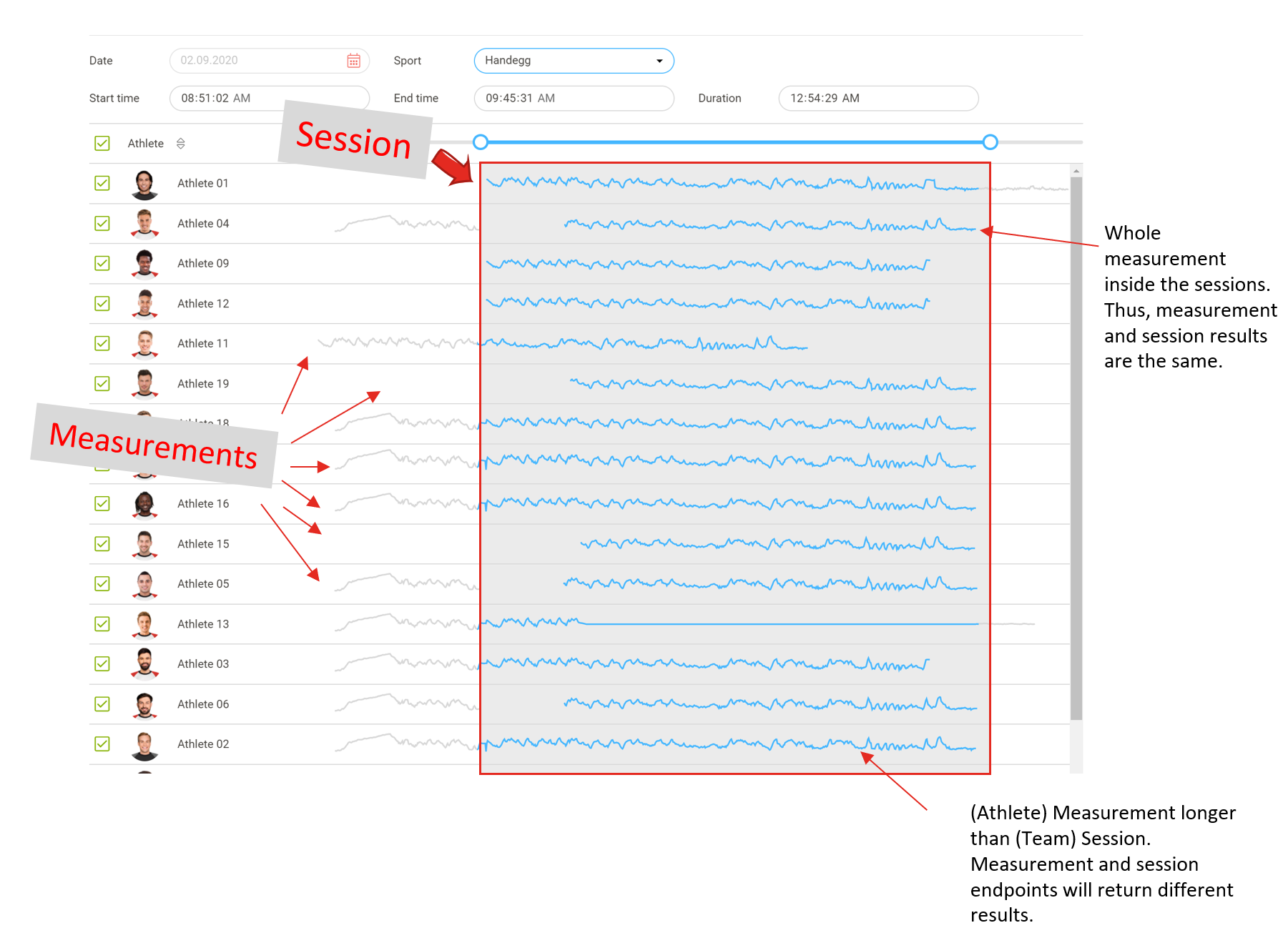
In the figure above, the lines represent the athlete measurements. The red box marks time range of the team session created by the Coach. Selection boxes for each athlete show that all athletes are included in the session.
Session time range can cut the included athlete data (measurement) from the beginning, end or both. In this case, the session analysis results only include the data for the selected time range. If the measurement is fully inside the session time range, then the measurement analysis results are the same as the session analysis results for the athlete.
Example API output for a Session:
{
    "athleteIds": [
        445072,
        577045
    ],
    "coachId": 416315,
    "endTime": "2025-03-06T10:59:50Z",
    "endTimeLocal": "2025-03-06T12:59:50+02:00",
    "eventType": "training",
    "sessionType": "Run",
    "sessionId": 885235,
    "sportsType": "running",
    "startTime": "2025-03-06T10:07:39Z",
    "startTimeLocal": "2025-03-06T12:07:39+02:00"
}
Details
- A single measurement can be included in multiple sessions (e.g., an athlete's morning training might be part of both a "Full Squad Session" and a "Forwards Group Session").
- Session time periods can overlap (e.g., separate sessions for different groups training at the same time).
- Sessions always belong to a specific team.
Laps
Laps can be created within measurements or sessions to analyze specific time segments. A lap is a subdivision with its own analysis results for a coach-defined portion of a measurement or session.
Laps vs. Sessions
Sessions define the time frame and participants for team training analysis.
Laps subdivide sessions or measurements into smaller segments for detailed analysis.
Example: A session could span an entire ice hockey game (60 minutes), with separate laps created for each of the three periods (20 minutes each). This allows coaches to compare performance across periods.
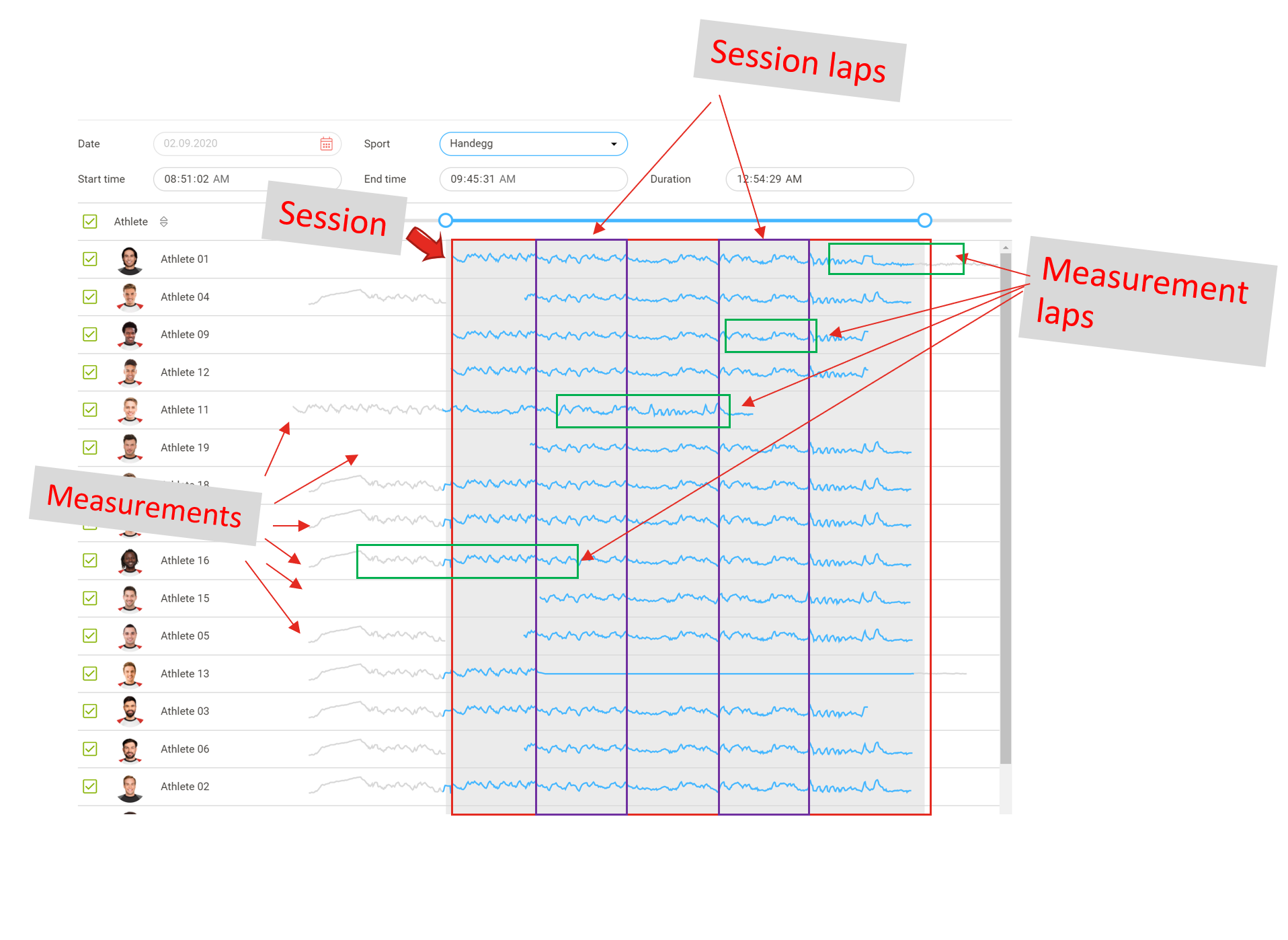
Coach can create laps for the session and also select which athletes to include (purple boxes). It's also possible to create laps for measurements (green boxes). Since measurements always belong to one athlete, the corresponding laps also belong to that particular measurement only.
Laps created for sessions are not copied to athlete measurements. Like wise, laps created for measurements are not copied to sessions.
Analysis results
Firstbeat Sports Cloud API distinguishes between retrieving basic information about measurements, sessions, and laps versus getting their analysis results. Training data resources have analysis results that contain calculated variables like TRIMP, EPOC, Training Effect, and time in heart rate zones.
For example,
https://api.firstbeat.com/v1/sports/accounts/{accountId}/athletes/{athleteId}/measurements/{measurementId}
Returns basic information like start and end time of the measurement. To get the analysis results, you need to query:
https://api.firstbeat.com/v1/sports/accounts/{accountId}/athletes/{athleteId}/measurements/{measurementId}/results
This same pattern applies to sessions and laps throughout the API.
Variables
Analysis results consist of variables (metrics). There are two types of variables in Firstbeat Sports:
- Scalars: Single values calculated from the entire measurement, session or lap. For example, maximum heart rate might be
189 bpmor TRIMP145. - Time series: Arrays of values recorded at each time point during the measurement. For example, heart rate values per second:
[115, 115, 117, 124, 128, ...].
Important notes:
- Variable availability depends on measurement type. For example,
exercisemeasurements don't include Quick Recovery Test variables. - Use the
varquery parameter to request specific variables:?var=trimp,trimpPerMinute,heartRateAverage - Always request only the variables you need. Requesting all variables slows down the API response and may exceed payload size limits.
A list of available variables can be found here.